Ailt Document Image Converter Pro

All Documents & Images → Any format

Ailt Document Image Converter Pro is an easy-to-use and professional converting tool. With this powerful converter, you can convert between different office document formats,PDF, web page, images with fast conversion speed. It can support comprehensive formats: PDF, doc, docx, docm, rtf, xls, xlsx, xlsm, ppt, pptx, pptm, txt, htm, jpg, jpeg, bmp, emf, wmf, tif, gif, png, pcx, ico, j2k, jp2 etc. More setting options can be provided to let you control the output file more accurately.

One-time license Windows 11 / 10 Free trial
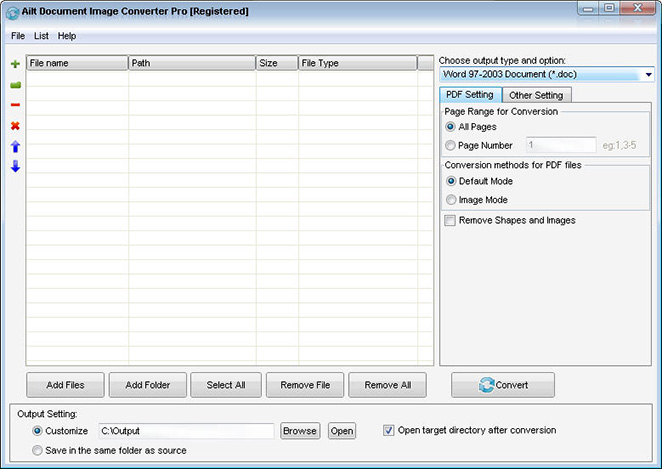
Ailt Document Image Converter Pro — Windows application screenshot

Advanced Features

  • Clean, user-friendly interface.
  • Batch-convert different formats into one chosen format.
  • Standalone application — no Adobe Acrobat required.
  • Add files by dragging and dropping them into the list.
  • Save and reload your conversion list for repeat jobs.
  • Convert an entire folder in one go.
  • Convert DOCX, DOCM, XLSX, XLSM, PPTX, PPTM of MS-Office 2007 and later.
  • Extract text from PDFs for conversion.
  • Convert the encrypted PDF file.
  • Convert the whole PDF at once or select specific pages.
  • Keep the original layout, text, images and vector drawings in the output.
  • Convert Word, Excel, PowerPoint, PDF and image files with excellent quality.
  • Customize the DPI when converting PDF to image format.
  • Customize the frame rate.
  • Customize page size.
  • Converts PDF files into Word, Excel, PowerPoint, HTML and more documents.
  • Convert PDF to Word in default or image mode.
  • Convert PDF to Excel in plain-text or image mode.
  • Extract data from PDF tables into editable Excel spreadsheets.
  • Combine all PDF pages into a single Excel worksheet.
  • Convert PDF to PowerPoint while preserving the original content and layout.
  • Convert PDF to HTML in default or text-extraction mode.
  • Automatically resize Word/RTF page to fit your converted Excel page size.
  • Resize image to fit PDF page size.
  • Customize GIF image change interval.
  • Customize the output image size.
  • Resize images while keeping their aspect ratio.
  • Customize image color depth.
  • Customize image rotate.
  • Save each Word/RTF page as a separate file.
  • Convert each page of a PDF into a single HTML, image, GIF or TIFF file.
  • Convert each PowerPoint slide into a single PDF.
  • Convert all pages of a multi-page PDF into a multi-page Word, Excel, PowerPoint, TIFF or multi-frame GIF file.
  • Convert all pages of multi-page PowerPoint, TIFF, GIF to PDF.
  • Merge PowerPoint slides into one PDF, HTML, GIF or TIFF file.
  • Merge converted images into a multi-page Word, Excel, PowerPoint, TIFF or multi-frame GIF file.
  • Convert text content into a multi-page TIFF file.
  • Convert text-file content into multiple frames.
  • Create PDF file from any document and image with three modes (default mode, image mode, text mode).
  • Create PDFs with user and owner password protection.
  • Set JPG/JPEG image quality from 1 to 100.
  • Set the icon size and color depth.
  • Choose the storage path.
  • Automatically open the output folder when conversion finishes.
  • Save output files next to the source files.
  • Fine-tune output quality with user-defined parameters.
  • Clean, intuitive interface — finished in just a few clicks.

How to use

  1. Download and install the free trial, then open the app on Windows 11/10.
  2. Click Add Files and select the documents you want to convert.
  3. Pick the output format and folder, then click Convert.

Supported formats

Input

All Documents & Images

Output

Any format

Why choose this tool

Bundles Batch Windows 11 / 10 OCR

Need more OCR languages?

The built-in OCR engine already covers English, French, German, Italian, Spanish and Portuguese. Download additional language packs for 60 languages in total.

Get language packs →
FAQ

Common questions

All Ailtware converters run natively on Windows 11 and Windows 10. They are desktop apps — no internet connection is required to convert.

Yes. Every tool offers a free trial you can download from the Downloads page. The trial is fully functional with a small output limit so you can evaluate it first.

Yes. Ailt Image to Word RTF Converter includes a built-in OCR engine that turns scanned images into editable Word and RTF documents, with 60 language packs available.

Absolutely. Every converter supports folder-level batch conversion so you can process hundreds of files in one run.

Ailtware uses a one-time license — pay once, use forever. No subscription.

We offer a 30-day money-back guarantee if the software does not meet your needs.

Related converters