Ailt PowerPoint to JPG BMP Converter

PowerPoint → JPG/BMP

Ailt PowerPoint to JPG BMP Converter is a powerful and easy-to-use PowerPoint utility that is designed to batch convert PowerPoint document (including PPT, PPTX,PPTM) to JPEG, JPG, BMP with accurately retaining the original document quality. User-friendly interface allows you to use very easily without any learning curve. Merely need a few clicks. Add the converted files to the list and click "convert" conversion can be done automatically.

One-time license Windows 11 / 10 Free trial
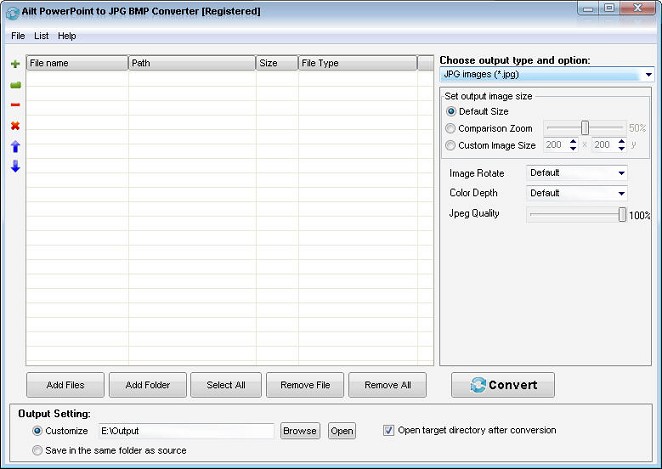
Ailt PowerPoint to JPG BMP Converter — Windows application screenshot

Advanced Features

  • Clean, user-friendly interface.
  • Convert PPTX, PPTM of Office 2007 and later to JPEG, JPG, BMP file.
  • Batch-convert multiple PowerPoint documents at once.
  • Add files by dragging and dropping them into the list.
  • Save and reload your conversion list for repeat jobs.
  • Convert an entire folder in one go.
  • Convert each slide content of PowerPoint to single JPEG, JPG, BMP image.
  • Set JPEG/JPG image quality from 1 to 100.
  • Customize the output image size.
  • Resize images while keeping their aspect ratio.
  • Set image color depth and rotation.
  • Choose where output files are saved.
  • Automatically open the output folder when conversion finishes.
  • Save output files next to the source files.

How to use

  1. Download and install the free trial, then open the app on Windows 11/10.
  2. Click Add Files and select the documents you want to convert.
  3. Pick the output format and folder, then click Convert.

Supported formats

Input

PowerPoint

Output

JPG/BMP

Why choose this tool

Office Batch Windows 11 / 10 Offline
FAQ

Common questions

All Ailtware converters run natively on Windows 11 and Windows 10. They are desktop apps — no internet connection is required to convert.

Yes. Every tool offers a free trial you can download from the Downloads page. The trial is fully functional with a small output limit so you can evaluate it first.

Yes. Ailt Image to Word RTF Converter includes a built-in OCR engine that turns scanned images into editable Word and RTF documents, with 60 language packs available.

Absolutely. Every converter supports folder-level batch conversion so you can process hundreds of files in one run.

Ailtware uses a one-time license — pay once, use forever. No subscription.

We offer a 30-day money-back guarantee if the software does not meet your needs.

Related converters