Ailt Website Capture Pro Command Line

Website → Image / PDF

Ailt Website Capture Pro Command Line is a program based on Windows platform, which allows the batch capturing of large numbers of webpage at the same time. With it, you can batch capture screenshots of website URL, HTM, HTML webpages, Internet Shortcut into full sized image with command line.

One-time license Windows 11 / 10 Free trial
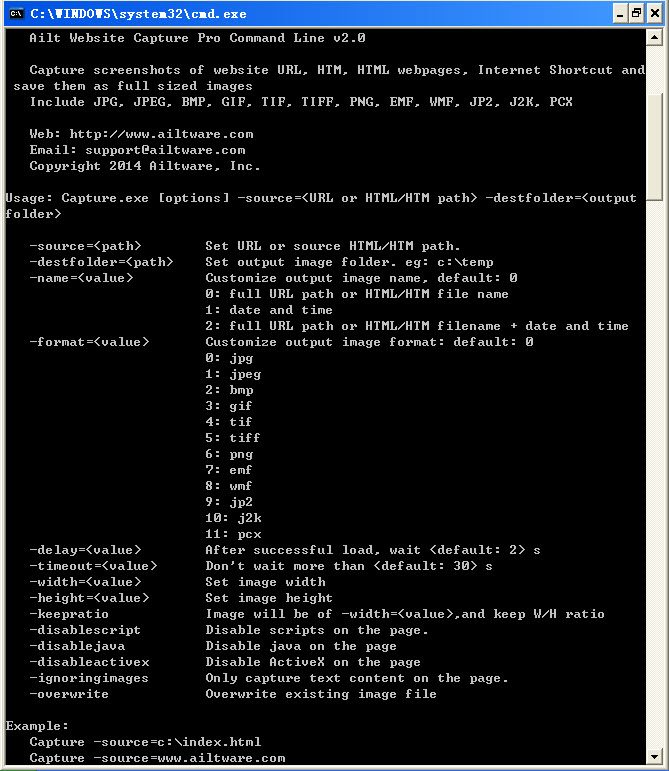
Ailt Website Capture Pro Command Line — Windows application screenshot

Advanced Features

  • Capture a full-size screenshot of any web page.
  • Take a snapshot of an entire web page into a single image, with no scrollbars.
  • Retrieve pages for capture via HTTP, HTTPS, or from local HTM, HTML and Internet Shortcut files.
  • Supports JPEG, JPG, BMP, PNG, GIF, TIFF, TIF, EMF, WMF, JP2, J2K, PCX and other image formats.
  • Option to disable JAVA, ActiveX and Scripts on the captured web page.
  • Set the number of seconds to wait for a web page to finish loading before capture.
  • Capture a delayed snapshot of a web page after it has finished loading.
  • Capture text-only content, skipping images on the page.
  • Customize the output image file name.
  • Set a custom output image size (width and height).
  • Keep the original width/height ratio when resizing the output image.
  • Choose the output image format.
  • Launch from the command line, a batch file or another application.
  • Automatically name newly created image files using customizable naming rules.

How to use

  1. Install Ailt Website Capture Pro Command Line on Windows, then open Command Prompt.
  2. Run the Capture command with -source= set to a URL or a local HTML/HTM file path.
  3. Add -destfolder= to choose where the images are saved (e.g. c:\output).
  4. Tune the result with -format=, -name=, -width=/ -height= or -delay= as needed.
  5. Capture many pages by listing URLs/paths in a file and looping the command from a batch file or another application.

Command Line Parameters

Usage
Capture [ options ] -source= <URL or HTML/HTM path> -destfolder= <output folder>
Options
-source= <path>Set URL or source HTML/HTM path.
-destfolder= <path>Set output image folder. eg: c:\temp.
-name= <value>Customize output image name, default: 0.
0:full URL path or HTML/HTM file name.
1:date and time.
2:full URL path or HTML/HTM filename + date and time.
-format= <value>Customize output image format: default: 0.
0:jpg
1:jpeg
2:bmp
3:gif
4:tif
5:tiff
6:png
7:emf
8:wmf
9:jp2
10:j2k
11:pcx
-delay= <value>After successful load, wait <default: 2> s.
-timeout= <value>Don't wait more than <default: 30> s.
-width= <value>Set image width.
-height= <value>Set image height.
-keepratioImage will be of -width= <value> , and keep W/H ratio.
-disablescriptDisable scripts on the page.
-disablejavaDisable java on the page.
-disableactivexDisable ActiveX on the page.
-ignoringimagesOnly capture text content on the page.
-overwriteOverwrite existing image file.
Examples
Capture -source=c:\index.html
Capture -source=www.ailtware.com
Capture -source=www.ailtware.com -destfolder=c:\output -name=2 -ignoringimages
Capture -source=www.ailtware.com -destfolder=c:\output -name=0 -format=3
Capture -source=www.msn.com -destfolder=c:\output -name=1 -format=1
Capture -source=www.msn.com -destfolder=c:\output -name=1 -format=3 -overwrite -delay=20
Capture -source=www.yahoo.com -destfolder=c:\output -name=2 -format=2 -width=800 -keepratio -delay=5 -timeout=10

Supported formats

Input

URL  ·  Local HTML/HTM file  ·  Web page

Output

JPG  ·  JPEG  ·  BMP  ·  GIF  ·  TIF  ·  TIFF  ·  PNG  ·  EMF  ·  WMF  ·  JP2  ·  J2K  ·  PCX

Why choose this tool

Tools Batch Windows 11 / 10 Offline
FAQ

Common questions

All Ailtware converters run natively on Windows 11 and Windows 10. They are desktop apps — no internet connection is required to convert.

Yes. Every tool offers a free trial you can download from the Downloads page. The trial is fully functional with a small output limit so you can evaluate it first.

Yes. Ailt Image to Word RTF Converter includes a built-in OCR engine that turns scanned images into editable Word and RTF documents, with 60 language packs available.

Absolutely. Every converter supports folder-level batch conversion so you can process hundreds of files in one run.

Ailtware uses a one-time license — pay once, use forever. No subscription.

We offer a 30-day money-back guarantee if the software does not meet your needs.

Related converters