Ailt Word to Image Converter

Word → Image

Ailt Word to Image Converter is a professional and powerful Word document to image file converter. With it, you can batch convert your DOC, DOCX, DOCM format files to any type of images like JPEG, JPG, BMP, PNG, EMF, WMF, TIFF, GIF, PCX, JP2, J2K etc. The output image quality is super good with preserving the original text, image, layout etc. More setting options can be provided to let you control the output file more accurately.

One-time license Windows 11 / 10 Free trial
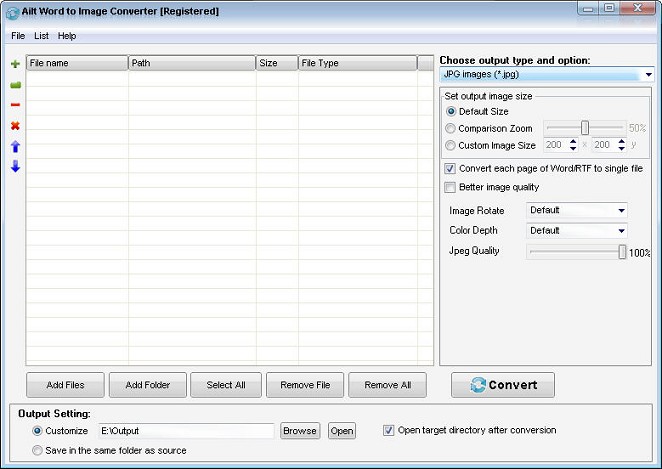
Ailt Word to Image Converter — Windows application screenshot

Advanced Features

  • Clean, user-friendly interface.
  • Batch-convert multiple Word, RTF documents at once.
  • Add files by dragging and dropping them into the list.
  • Save and reload your conversion list for repeat jobs.
  • Convert an entire folder in one go.
  • Convert DOCX, DOCM of Office 2007 and later to image.
  • Preserves the original Word, RTF document text, table, layout and more.
  • Save each Word/RTF page as a separate image.
  • Convert all pages of multi-page Word, DOCX, DOCM, RTF to one multi-page TIFF image.
  • Convert all pages of multi-page Word, DOCX, DOCM, RTF to one multi-frame GIF image.
  • Set the GIF frame interval.
  • Set JPG/JPEG image quality from 1 to 100.
  • Customize the output image size.
  • Resize images while keeping their aspect ratio.
  • Set image color depth and rotation.
  • Set the icon size and color depth.
  • Choose where output files are saved.
  • Automatically open the output folder when conversion finishes.
  • Save output files next to the source files.

How to use

  1. Download and install the free trial, then open the app on Windows 11/10.
  2. Click Add Files and select the documents you want to convert.
  3. Pick the output format and folder, then click Convert.

Supported formats

Input

Word

Output

Image

Why choose this tool

Image Batch Windows 11 / 10 Offline
FAQ

Common questions

All Ailtware converters run natively on Windows 11 and Windows 10. They are desktop apps — no internet connection is required to convert.

Yes. Every tool offers a free trial you can download from the Downloads page. The trial is fully functional with a small output limit so you can evaluate it first.

Yes. Ailt Image to Word RTF Converter includes a built-in OCR engine that turns scanned images into editable Word and RTF documents, with 60 language packs available.

Absolutely. Every converter supports folder-level batch conversion so you can process hundreds of files in one run.

Ailtware uses a one-time license — pay once, use forever. No subscription.

We offer a 30-day money-back guarantee if the software does not meet your needs.

Related converters